



DRC-07
The Indian government has set up a significant digital network to implement and govern GST in India. The communication between the taxpayers and the tax department has also been digitized to a significant extent compared to the earlier indirect tax regime. In this article, we will discuss one such FORM DRC-07 in GST portal facilitating communication between the tax department and taxpayer:
What Is FORM DRC 07 in GST?
DRC 07 GST: According to Rule 100(1) of the CGST Rules, 2017, an assessment order is issued as per Section 62(1) of the CGST Act, 2017 in FORM GST ASMT-13 and a summary of the assessment should be uploaded electronically on the GST portal in FORM GST DRC 07. DRC 7 under GST will include the demand details (like tax/cess, interest, penalty, and any other amounts payable by the taxpayer). As soon as this form is uploaded by the Tax Department on the GST portal, an email and SMS notification is sent to the taxpayer. The taxpayers can view the order on their dashboard. So let's know how to make payment against DRC 07 payment.
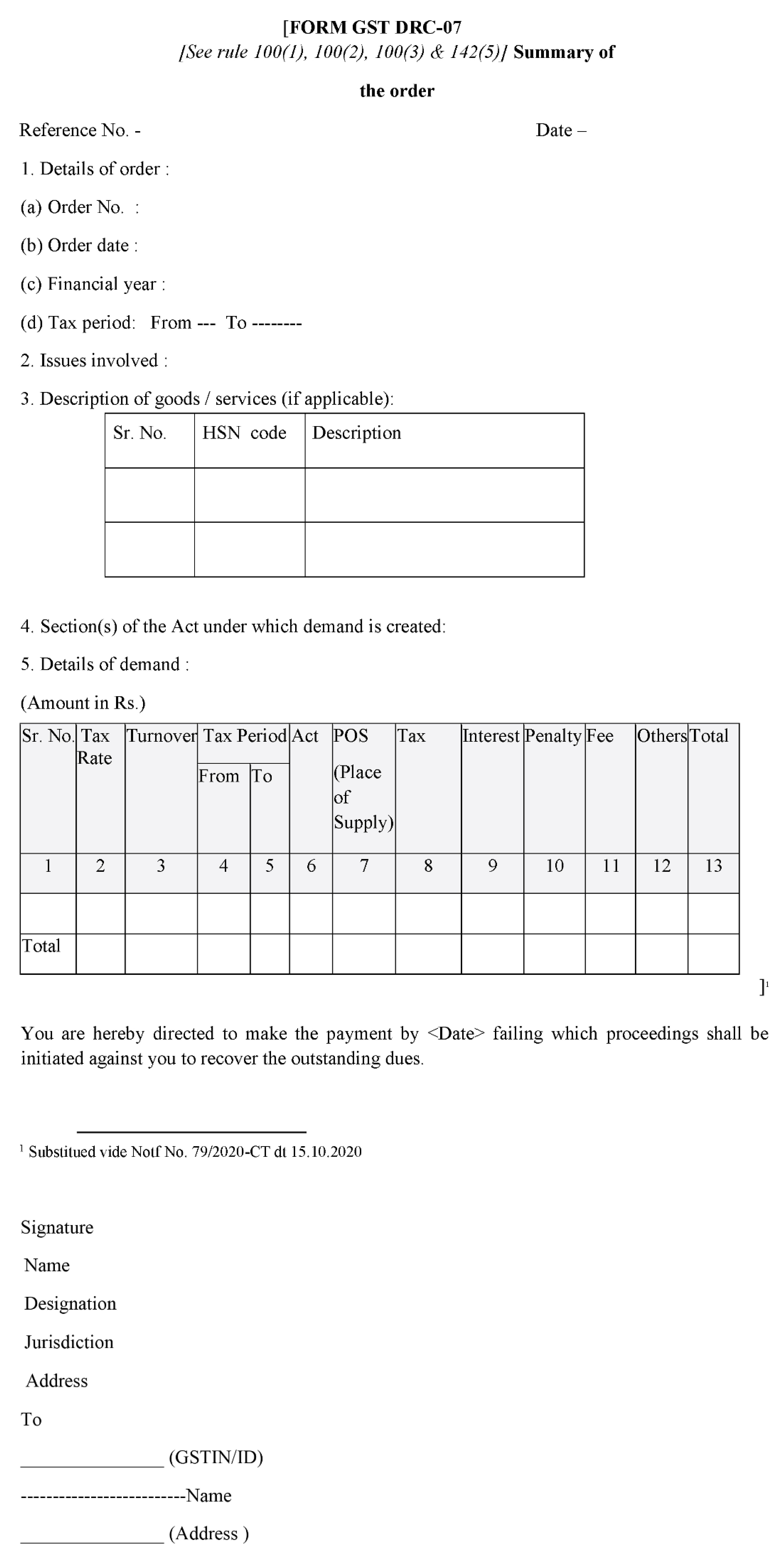
Format of Form DRC-07
The format of Form DRC-07 in GST includes details of the order (number, date, tax period), issues involved (classification, valuation etc.), description of goods/services, and a breakdown of the tax demand (tax, interest, penalty etc.). It allows you to understand the reason and amount of outstanding GST you owe.
Steps To Make Payment For Demand Raised In FORM GST DRC-07
- Step 1: Log in on the GST Portal.
- Step 2: Navigate to ‘Services’ and select ‘View Notices and Orders’ to view the assessment order and demand raised by the tax department.
 Alternatively, the taxpayer can move to the ‘Electronic Liability Register’ available under ‘Services’ in ‘Ledgers’.

- Step 3: In the Electronic Liability Register, select ‘Part II: Other than return related liabilities’.

- Step 4: The taxpayers can then select the desired period to view the demand orders.

- Step 5: The portal will display the details of liabilities of the taxpayer for the selected period along with the Demand ID with reference to the Form GST DRC07 and amounts of IGST, CGST, SGST, and cess payable.


- Step 6: To make the payments towards the demands raised, the taxpayers should select, ‘Services’. Here, under ‘Ledgers’ select ‘Payment towards Demand’ and select the relevant period.

The taxpayer can click on ‘Select’ to view the breakup of tax due.

- Step 7: The page will display the ‘Outstanding Demand’, and the taxpayer can enter their details in the ‘Amount intended to be paid’ column.

- Step 8: The Taxpayers can make the payments using the available balance in their Electronic Cash Ledger or the Electronic Credit Ledger. Once the payment is made, the portal will display a ‘Payment Successful’ message.
Need for GST In India | GST Invoice Serial Number Rules | Powers of GST Officers | Dry Fruits GST Rate | Maintenance Charges GST
Frequently Asked Questions
About the Author

- ★★
- ★★
- ★★
- ★★
- ★★

Check out other Similar Posts

CFO Weekly Digest
A weekly newsletter delivering sharp insights, strategic analysis, and critical updates on business, finance, and compliance — designed exclusively for CFOs and Finance Leaders
Masters India is a GST Suvidha Provider (GSP) appointed by Goods and Services Tax Network (GSTN), a Government of India enterprise.
 Procapitus Business Park, 4th Floor, D 247/4A, Sector 63 Rd, Noida, Uttar Pradesh 201301
 info@mastersindia.co




Certified