



Using Communication Between Taxpayers Feature
The GSTN has launched the ‘Communication between taxpayers in GST’ feature on the GST portal. Through this platform, taxpayers can communicate with suppliers/recipients/purchasers as required directly through the portal dashboard.
Features Of ‘Communication Between Taxpayers’ Facility
- The new functionality provides a simple communication platform for taxpayers. For example, a recipient/purchaser can ask his/her supplier/s to upload any particular invoice/s that has not been uploaded but is required by the recipient to avail Input Tax Credit (ITC) directly, through the GST portal.
- Businesses can communicate about deficiencies in invoices with the supplier directly (if required). They can also ask the supplier/s to amend uploaded invoices or remove wrongly uploaded invoice/s. Payment related issues can also be communicated through this feature.
- Suppliers can reply to the recipient/purchaser through the same facility.
- Suppliers can send notifications to their recipient/purchaser about documents uploaded in the outward supply statement filed in Form GSTR-1.
- When a taxpayer sends a communication to his/her counterpart (through this feature), the GSTN will also send an intimation to the counterpart through an email and SMS.
How To Use ‘Communication Between GST Taxpayers’ Feature?
Step 1: Log in to the GST portal.
Step 2: Under ‘Services’, select ‘User Services’ and ‘Communication between Taxpayers’.

Step 3: Click on ‘Compose’ to start a communication thread. The user interface of this feature is similar to that of an email box. Users can see options like Inbox, Compose, Outbox, etc.

Step 4: Fill in the required fields.
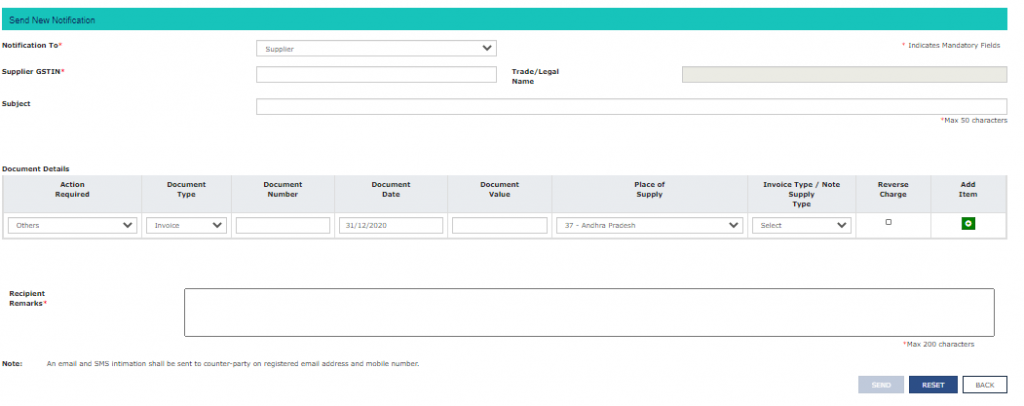
The options available under the following heads are illustrated below: ‘Notification To’:
- Supplier
- Recipient
The Taxpayer should select the correct party with whom he/she wishes to communicate. ‘Document Details - Action Required’
- File Missing Document
- Rejected-amendment required
- Rejected-wrongly sent to me (For deletion of invoice uploaded wrongly)
- Re-upload document
- Payment made (Intimation of payment made)
- Others
The reason for communication should be selected here. Document Type
- Invoice
- Debit Note
- Credit Note
Note: Click on ‘Add item’ to add rows.
Step 5: Once the details are added, click on ‘Save’ to save the row. Remarks can also be added. However, there is a limit of 200 characters here.
Step 6: Click on ‘Send’ to send the communication. An email and SMS will be sent on the registered email address and mobile number of the recipient (of the communication) simultaneously. Note:
- Communications sent can be viewed in the outbox tab.
- Communications received can be replied to like an email.
Need for GST In India | GST Invoice Serial Number Rules | Powers of GST Officers | Dry Fruits GST Rate | Maintenance Charges GST
About the Author

- ★★
- ★★
- ★★
- ★★
- ★★

Check out other Similar Posts

CFO Weekly Digest
A weekly newsletter delivering sharp insights, strategic analysis, and critical updates on business, finance, and compliance — designed exclusively for CFOs and Finance Leaders
Masters India is a GST Suvidha Provider (GSP) appointed by Goods and Services Tax Network (GSTN), a Government of India enterprise.
 Procapitus Business Park, 4th Floor, D 247/4A, Sector 63 Rd, Noida, Uttar Pradesh 201301
 info@mastersindia.co




Certified