



How to Download 8A from GST Portal?
GSTR-9 is an annual return that has to be filed by every GST registered Taxpayer. For the Financial Year (FY) 2018-19, the due date to file GSTR-9 is extended to 31 December 2020. The table 8A of GSTR-9 is a critical section. It contains details of the total Input Tax Credit (ITC) available during the relevant financial year. These ITC details need to be verified carefully while determining the GST liability and filing GSTR-9.
To help taxpayers view document wise details of the ITC available, the Government has enabled the GSTR 8A download option on the GSTR-9 dashboard. In this article, we will discuss the ‘Download Document wise Details of Table 8A’ facility in brief.
Features
- Taxpayers can download 8A GST portal document wise details of Table GST 8A download of Form GSTR-9 from the GST portal in excel format henceforth (Financial Year 2018-19 onwards).
- The download option will be available only after the GSTR-9 tab is enabled.
- The downloaded file will help taxpayers to reconcile the ITC values (Table 8A values).
- The ITC details in table GSTR 8A of the Form GSTR-9 are auto-populated based on the details available in the GSTR-1/GSTR-5 (of the supplier) already filed.
Note: Documents which are in uploaded or submitted stage (in Form GSTR-1/GSTR-5, will not be visible in table 8A of Form GSTR-9).
- This excel file will help taxpayers to reconcile the amount of Input Tax Credit (ITC) visible in the GSTR-2A and the amounts populated in the Table 8A of GSTR-9.
- When the number of documents is limited, the excel files will be downloaded as a .zip file. However, if the number of documents is large, then, taxpayers can download the details in multiple parts.
Now, we discuss how to download table 8A of GSTR 9 from GST portal. See the steps below and know the exact way to download table 8A.
Steps To Download Document-Wise Details Of Table 8A Of Form GSTR-9
> Step 1: Log in to the GST Portal.
> Step 2: Under ‘Services’, select ‘Returns’ and then ‘Annual Return’.
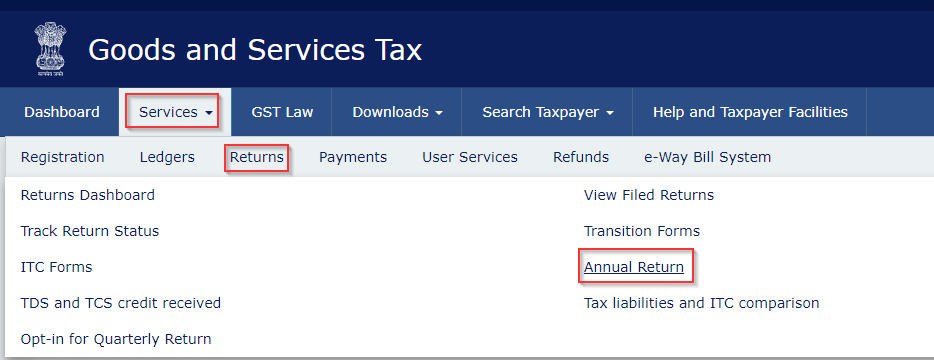
> Step 3: Select the relevant ‘Financial Year’ and under ‘Form GSTR-9’ select ‘PREPARE ONLINE’. Here, taxpayers can directly select the ‘DOWNLOAD TABLE 8A DOCUMENT DETAILS’ option.
Note: The downloaded excel file will contain:
- GSTIN of the supplier.
- Trade Name/Legal Name of the supplier.
- The period (month) in which the document is recorded in the GSTR-2A of the recipient.
- Document wise details of:
- B2B invoices,
- Amended B2B invoices (B2BA),
- CDNR (credit and debit notes) and
- Amended credit and debit notes (CDNRA)
filed by the supplier in their Form GSTR-1/GSTR-5. These details will be available in separate Excel sheets. In the case of amendments, only the latest values will be accounted for.
- Details from Form GSTR-1/GSTR-5 (filed till 31 October of the subsequent year).
- A ‘Yes’ or ‘No’ format column, specifying if ITC is available or not (ITC available for Table 8A items).
- If ITC is not available, a column named ‘Reason for Non-accounting’ with reasons for non-accounting in Table 8A will also be available.
Need of GST In India | 16 Digit Invoice Number in GST | GST Inspector Salary | Dry Fruits Hsn Code | GST Maintenance Charges
Frequently Asked Questions
About the Author

- ★★
- ★★
- ★★
- ★★
- ★★

Check out other Similar Posts

CFO Weekly Digest
A weekly newsletter delivering sharp insights, strategic analysis, and critical updates on business, finance, and compliance — designed exclusively for CFOs and Finance Leaders
Masters India is a GST Suvidha Provider (GSP) appointed by Goods and Services Tax Network (GSTN), a Government of India enterprise.
 Procapitus Business Park, 4th Floor, D 247/4A, Sector 63 Rd, Noida, Uttar Pradesh 201301
 info@mastersindia.co




Certified