
Step-by-Step Guide to the New GST ITC and RCM Ledger Changes (As of December 30, 2025)

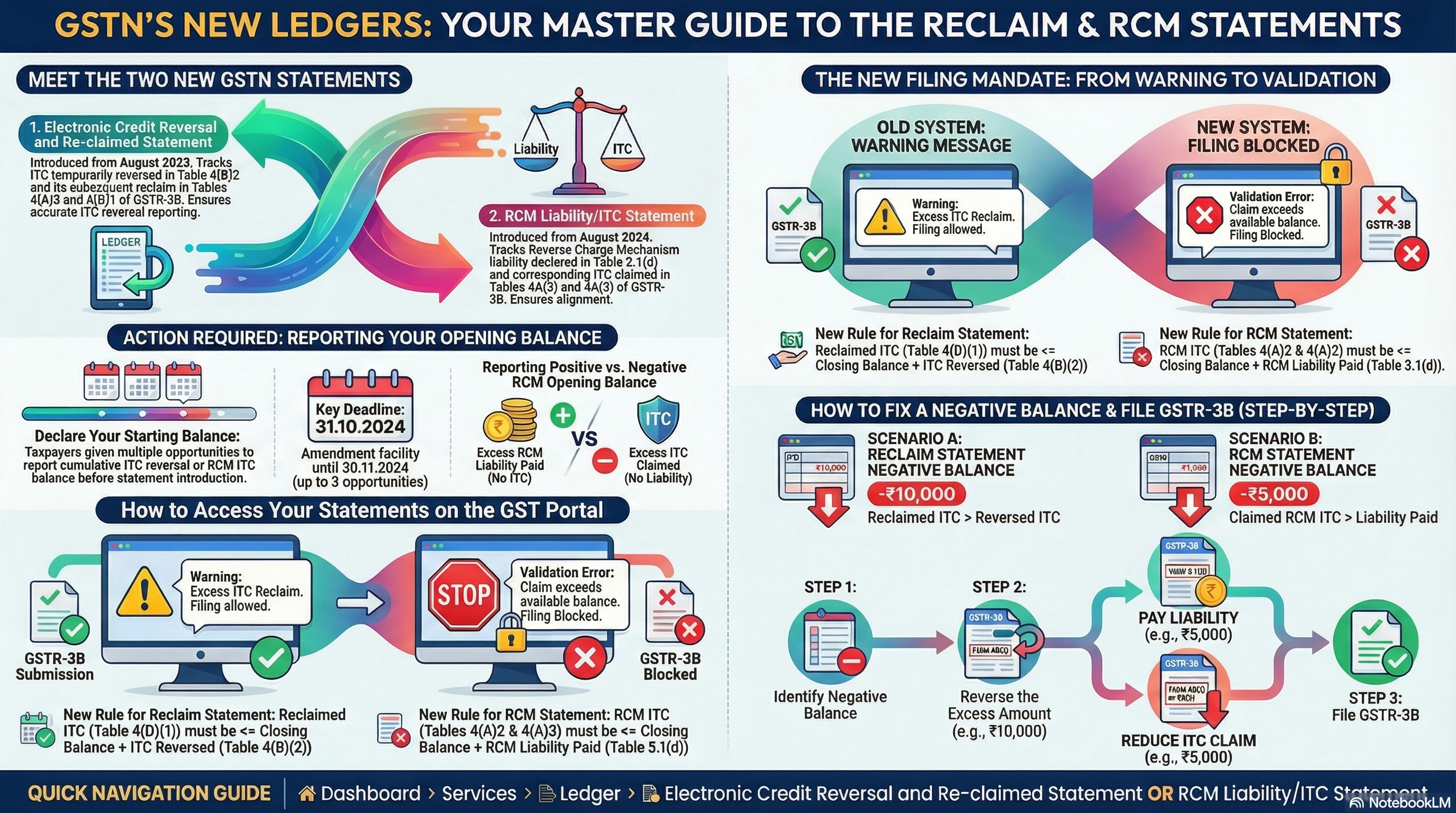 The recent changes announced by GSTN on December 29, 2025. These updates enforce strict validations on two key ledgers: the Electronic Credit Reversal and Re-claimed Statement (ITC Reclaim Ledger) and the RCM Liability/ITC Statement (RCM Ledger). Previously, the system only showed warnings for excesses or negatives; now, you can't file GSTR-3B if there's a discrepancy. This prevents errors in Input Tax Credit (ITC) claims, especially for reversals and Reverse Charge Mechanism (RCM) transactions.
Think of the ITC Reclaim Ledger as a tracker for ITC you temporarily reverse (e.g., due to rule violations) and later reclaim. The RCM Ledger tracks tax you pay on behalf of suppliers (RCM) and the ITC you claim on it.
This guide is for everyone, from beginners to the daily user. This guide explains every step in the GST portal at gst.gov.in. You'll need your GSTIN, username, password, and OTP-enabled mobile. Let's start!
Step 1: Log In to the GST Portal
- Open your web browser and go to www.gst.gov.in.
- On the homepage, click Login (top right).
- Enter your Username (usually your GSTIN or registered email/mobile) and Password.
- Solve the CAPTCHA (type the characters shown).
- Click Login. You'll receive an OTP on your registered mobile/email—enter it and submit.
- Once logged in, you'll land on the Dashboard. If you're a new user, ensure your profile is set up via Services > Registration > Amendment of Registration Non-Core Fields (if needed).
Step 2: Understand and Access the ITC Reclaim Ledger
- What it is: This ledger tracks ITC reversed in Table 4(B)(2) of GSTR-3B (e.g., for non-payment to suppliers) and reclaimed in Tables 4(A)(5) and 4(D)(1). Introduced in August 2023 (monthly filers) or July-Sept 2023 (quarterly). Now, reclaims can't exceed the closing balance + current reversals.
- From the Dashboard, hover over Services in the top menu.
- Click Ledger > Electronic Credit Reversal and Re-claimed.
- The ledger page opens, showing your Opening Balance, transactions per period, and Closing Balance. Scroll to check for negatives (red or minus sign)—this means past excess reclaims.
- Note: If you had pending reversals before 2023, you were allowed to report opening balances until Dec 2023 (with 3 amendments). That's closed now, so focus on current fixes.
Step 3: Access the RCM Ledger
- What it is: This tracks RCM liabilities paid in Table 3.1(d) and ITC claimed in Tables 4(A)(2) or 4(A)(3). Introduced in August 2024 (monthly) or July-Sept 2024 (quarterly). Now, claims can't exceed closing balance + current liabilities.
- From the Dashboard, go to Services > Ledger > RCM Liability/ITC Statement.
- The page displays your Opening Balance, period-wise RCM payments/claims, and Closing Balance. Look for negatives—indicating past excess ITC claims without matching payments.
- Pro tip for newbies: RCM applies to things like imports or services from unregistered vendors. If positive opening balance (excess payment), it's credit; negative means you owe.
Step 4: Check for Issues Before Filing GSTR-3B
- Before starting your return, always view both ledgers (Steps 2-3) to spot problems.
- If either shows a negative closing balance, you must fix it during filing— the system won't let you submit otherwise.
- Download ledger statements as PDF/Excel for records: On the ledger page, look for Download or Export buttons.
- Cross-check with your books: Compare ledger balances with your accounting software (e.g., Tally) for reversed/reclaimed amounts.
Step 5: Start Filing GSTR-3B and Fix ITC Reclaim Ledger Issues
- From Dashboard, go to Services > Returns > Returns Dashboard.
- Select your Financial Year (e.g., 2025-26), Return Period (month/quarter), and click Search.
- Click Prepare Online for GSTR-3B.
- Navigate to Table 4: Eligible ITC.
- If ITC Ledger is negative (e.g., -₹10,000 from past excess):
- In Table 4(B)(2) (Other Reversals), enter the negative amount as a reversal (positive value, e.g., ₹10,000). This corrects the excess.
- If no ITC available in current period, this reversal adds to your tax liability (shown in Table 6).
- In Table 4(D)(1), enter reclaims—but system validates: It must be ≤ (Ledger Closing Balance + Current 4(B)(2) Reversals).
- Click Save and Preview to see warnings/errors. Fix if any.
Step 6: Fix RCM Ledger Issues During GSTR-3B Filing
- In the same GSTR-3B form, go to Table 3.1(d) (Inward supplies liable to RCM).
- If RCM Ledger is negative (e.g., -₹5,000 from past excess ITC):
- Option 1: Pay extra RCM liability—enter additional amount (e.g., ₹5,000) in Table 3.1(d). This offsets the negative.
- Option 2: If current RCM ITC > negative, reduce claims in Table 4(A)(2) or 4(A)(3) by the negative amount (e.g., subtract ₹5,000 from eligible ITC).
- System validates: Claims in 4(A)(2)/4(A)(3) ≤ (Ledger Closing Balance + Current 3.1(d) Liabilities).
- Save and preview. If still negative, adjust until balanced.
Step 7: Complete and File GSTR-3B
- After fixes, go through all tables (1-6) in GSTR-3B.
- Click Compute Liabilities and Compute ITC to auto-populate.
- Verify totals in Table 6: Payment of Tax.
- If everything balances (no negatives/excesses), click Proceed to Payment.
- Pay any due tax via net banking/challan/NEFT.
- E-sign with DSC/Aadhaar OTP.
- Submit—download ARN for records.
- Post-filing, re-check ledgers (Steps 2-3) to confirm updates.
Step 8: Handle Special Cases and Best Practices
- If no current transactions: For ITC negatives, reversal in 4(B)(2) still adds liability. For RCM, pay minimum to cover.
- Amendments: Opening balances were amendable earlier (3 times, deadlines passed). For errors now, contact GST helpdesk via Services > Grievance Redressal.
- Warnings to Blocks: Pre-2025, excesses showed warnings; now blocked. Always file early.
- For Quarterly Filers: Same steps, but periods are quarters (e.g., Oct-Dec 2025).
- Resources: In ledgers, click help icons. Refer advisories: Download from portal or links like https://tutorial.gst.gov.in/downloads/news/itc_pending_ledger.pdf (ITC) or https://services.gst.gov.in/services/advisoryandreleases/read/514 (RCM).
- Newbie Tip: Practice on sandbox.gst.gov.in first. Consult a CA if complex.
Follow these steps to stay compliant—non-filing leads to penalties! If stuck, use portal's Help & Taxpayer Facilities > User Manuals.
Additional Downloads
- Introduction of RCM Liability & ITC Statement (PDF)
- Advisory on Claim and Reclaim RCM (PDF)
- ITC Pending Ledger Guide (PDF
Supreme court itc to be given to the purchaser even if tax is not deposited by seller | Matching reversal and reclaim of ITC | DRC-01 format | Powers of GST officers | GSTR 3B table 5
About the Author

- ★★
- ★★
- ★★
- ★★
- ★★

Check out other Similar Posts

CFO Weekly Digest
A weekly newsletter delivering sharp insights, strategic analysis, and critical updates on business, finance, and compliance — designed exclusively for CFOs and Finance Leaders
Masters India is a GST Suvidha Provider (GSP) appointed by Goods and Services Tax Network (GSTN), a Government of India enterprise.
 Procapitus Business Park, 4th Floor, D 247/4A, Sector 63 Rd, Noida, Uttar Pradesh 201301
 info@mastersindia.co




Certified