



Businesses are exploring and expanding. To accommodate the expansion, some businesses add additional places to their business list. The GST law requires taxpayers to disclose such amendments and additions on the GST portal. Here we are going to tell you about reason for adding additional place of business in GST, how to add additional place in GST or another business in GST (how to add godown address in GST), and how to add branch in GST. In this article, is it compulsory to add GST additional place of business and documents required for additional place of business in GST documents.
Here is How To Add Additional Place Of Business in GST Portal?
- Step 1: Log in to the GST Portal.
- Step 2: Under ‘Services’, select ‘Registration’ and then ‘Amendment of Registration Core Fields’.

- Step 3: Click on the ‘Additional place of business in GST’ (is it compulsory to add additional place of business in GST) tile and add the asked details. The basic details for GST address change required here are:
- Reason for amendment
- Date of amendment
Once these details are added, click on ‘Save’.
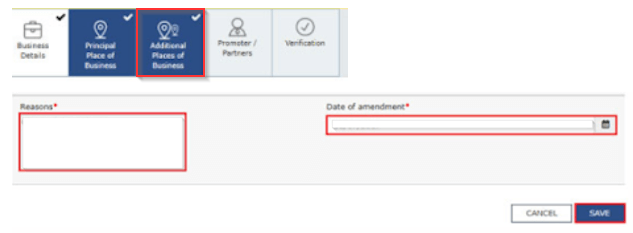
- Step 4: Click on the ‘Add new’ button and add the ‘Details of Additional Places of Your Business’.
- Step 5: Complete the verification process by selecting the verification checkbox, name of the authorized signatory from the drop-down list and adding the place of signing the application. This application needs to be signed electronically. The options available are:
- Submit with DSC
- Submit with E-Signature
- Submit with EVC

On successful submission of the application, a ‘Successful Submission’ message will be displayed on the screen. Furthermore, an acknowledgment will be automatically sent to the registered email address and mobile number within 15 minutes. Note:
- Taxpayers cannot file an amendment application if an earlier amendment application is yet to be processed. The status of such an application can be checked by following this path: Home->Services-> Registration->Track Application Status.
- If the taxpayer does not have an additional place of business yet, he/she will have to first navigate to the ‘Principle Place of Business’ tab and select ‘Yes’ under ‘Have Additional Place of Business’ tile to add an additional place of business.
- Taxpayers can edit the existing address of ‘Additional Place of Business’ under the ‘Details of Additional Places of Your Business’ tab this is how to add new address in GST portal.
- This amendment requires approvals from the tax officials.
- The approval/rejection status of the application will be communicated to the taxpayer via SMS and email.
Need of GST In India | 16 Digit Invoice Number in GST | GST Inspector Salary | Dry Fruits Hsn Code | GST Maintenance Charges
Frequently Asked Questions
About the Author

- ★★
- ★★
- ★★
- ★★
- ★★

Check out other Similar Posts

CFO Weekly Digest
A weekly newsletter delivering sharp insights, strategic analysis, and critical updates on business, finance, and compliance — designed exclusively for CFOs and Finance Leaders
Masters India is a GST Suvidha Provider (GSP) appointed by Goods and Services Tax Network (GSTN), a Government of India enterprise.
 Procapitus Business Park, 4th Floor, D 247/4A, Sector 63 Rd, Noida, Uttar Pradesh 201301
 info@mastersindia.co




Certified